
This semester, we are required to complete a team assignment for the cloud computing course, which is either “Design a Cloud Solution” or “Cloud Web Application Development and Deployment.”
At first, I wasn’t sure which one to choose because I was interested in both topics. If I choose the first option, I can act as an architect, designing the architecture of machines, networks, and databases on the cloud. I would be responsible for ensuring high availability and scalability. On the other hand, if I choose the second option, I will gain hands-on experience in coding and deploying applications to the cloud, which is something I find truly exciting.
Requirement from professor
For Option B, you are expected to develop a web application and deploy the application in the
cloud. You are free to develop any web application if it meets the following requirements.
You can use any cloud provider when you deploy your application. You also can use more than
one cloud provider. Try to use a free tier when you deploy your application. Cloud providers such as Azure, AWS and GCP have free credit to new starters or students. You are expected to do some research and choose the suitable service.
- Application Architecture: Your web application should be a Three-Tier
application, which has a backend layer, database layer and client layer. Two-Tier
application (backend layer and client layer is acceptable but you will lose partial
marks). You should let markers to access your backend layer without using client
layer. - Decoupling Services: Your web application should decouple clients and backend
service by Restful web services. You are expected to develop at least functional 10
RESTful services such as /login, /register, /upload_file including at least 3 post
method Restful API. You are expected to list all RESTful services and access URLs
on documentation. - Deployment on cloud: You are expected to deploy your client side and back end
(Restful API) on cloud. You can choose AWS EC2, Azure Web App, or some
similar services that can host your client side and backend side. You client side and
backend size should be accessible by markers. Markers can use public URLs to
access your client side and backend side (Restful API) from the time of your
submission until you receive notification that your assignment has been marked. - Cloud Database and Storage: The database of your web application can be any
cloud database (There are some free cloud databases or free tier database). There is
an example for free use of NoSQL database Firebase. You can choose SQL
databases such as AWS RDS, Azure SQL Database. You are expected to use one
of cloud database and you are not allowed to set up local database in VM such as
MySQL installed in EC2. The assets for web applications such as pictures, files,
etc. should store on cloud storage services such as AWS S3, Azure Blob Storage. - Languages/Framework: You can use any languages/framework to develop your
web application such as C#, PHP, .net, node.js. - Collaborate and Source Code Delivery: You are expected to collaborate work
within a Git repository and push your work to any cloud-based git service such as
GitHub, GitLab, Azure Repos. You should not apply Git history-rewriting related
operations to your repo and markers would access your repo and see group
members’ contributions. - You might integrate CI/CD (continuous integration and deployment) into your
deployment process. This means that you won’t need to manually upload your
artifacts to your server. Instead, any updates made to your GitHub repository will
automatically trigger the deployment to your server.
Group discussion
It didn’t take long to find group mates, as we shared common interests and were willing to work together. I found two classmates to join me. All of us are from the same country, which helps us think in similar ways when it comes to the project.
At first, we eliminated the first option because we all preferred doing practical work rather than just writing a theoretical paper. Although a well-written paper might earn a high mark, to us, it feels meaningless—like a cloud floating in the sky. What matters most is creating something real and deploying it to the cloud. That way, we can develop our comprehensive skills in both coding and deployment.
The next question was: what should we build? The project requirements suggest creating a decoupled web service, which means using a framework like React or Vue for the frontend, and a RESTful API for the backend. We also need to use a database to support CRUD operations through the API. There are still many things to figure out; right now, it feels like a messy pile of papers. I’ll discuss the rest in a future post.
Two ideas came to mind. One was to build a slot machine game where users can insert coins and pull a handle to see if three rolling numbers match. This idea came to me because one of our team members used to work as a game developer. The other idea was to create a weather website that allows users to check current and forecasted weather worldwide. I remembered that our professor had demonstrated an external weather API as an example of a RESTful service, which inspired me to think we could build something similar—like the weather app on an iPhone.
Once we reached a decision, we divided the tasks among ourselves. One member created a shared GitHub repository and gave us access. Another member started writing the proposal, which we needed to submit before starting the main development. My task was to turn our ideas into a visual sketch. Since I’ve worked as a Product Manager for eight years, I can quickly create product mockups that consider not only user stories but also the user interface, interactions, and the integration between the frontend and backend.
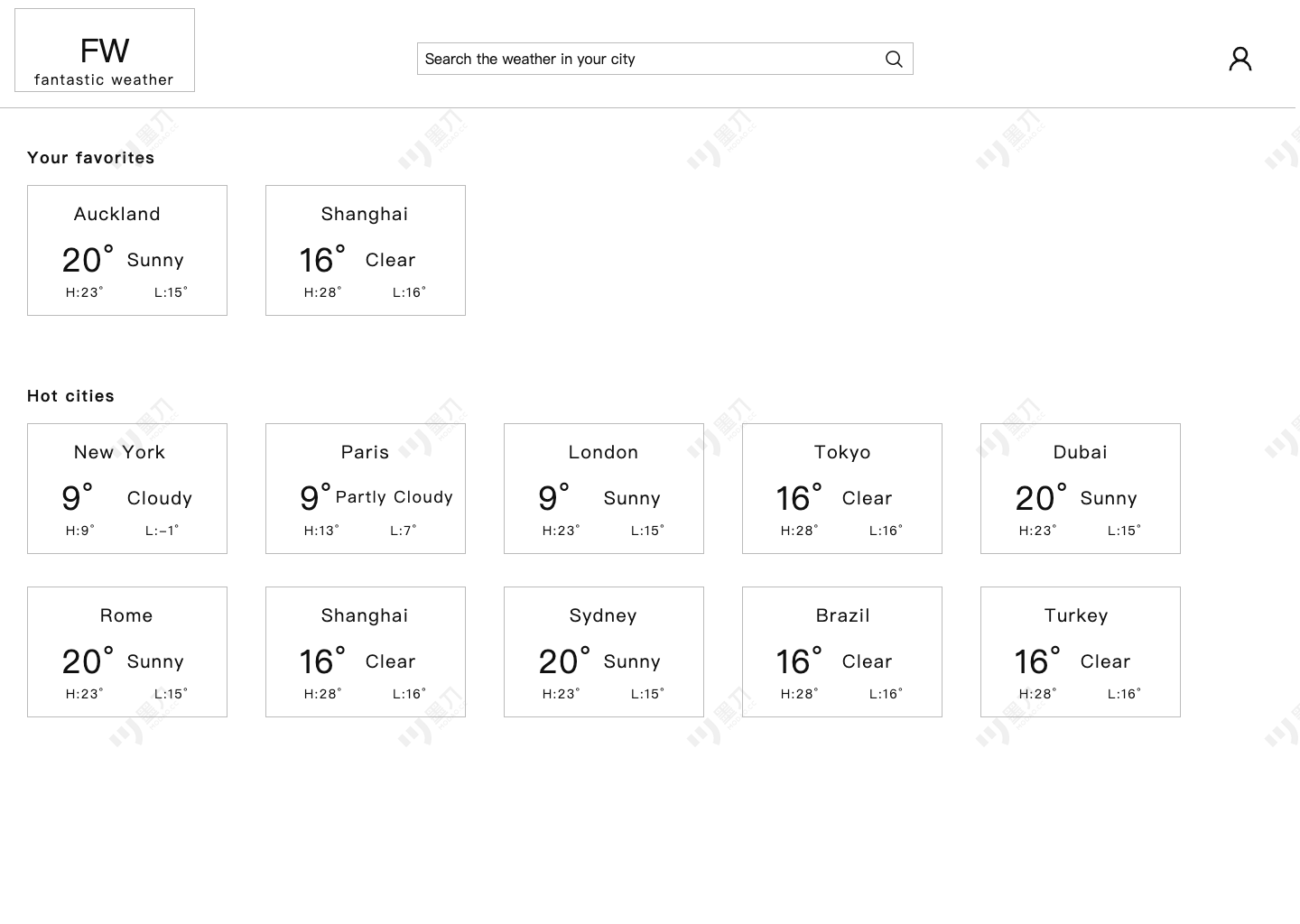
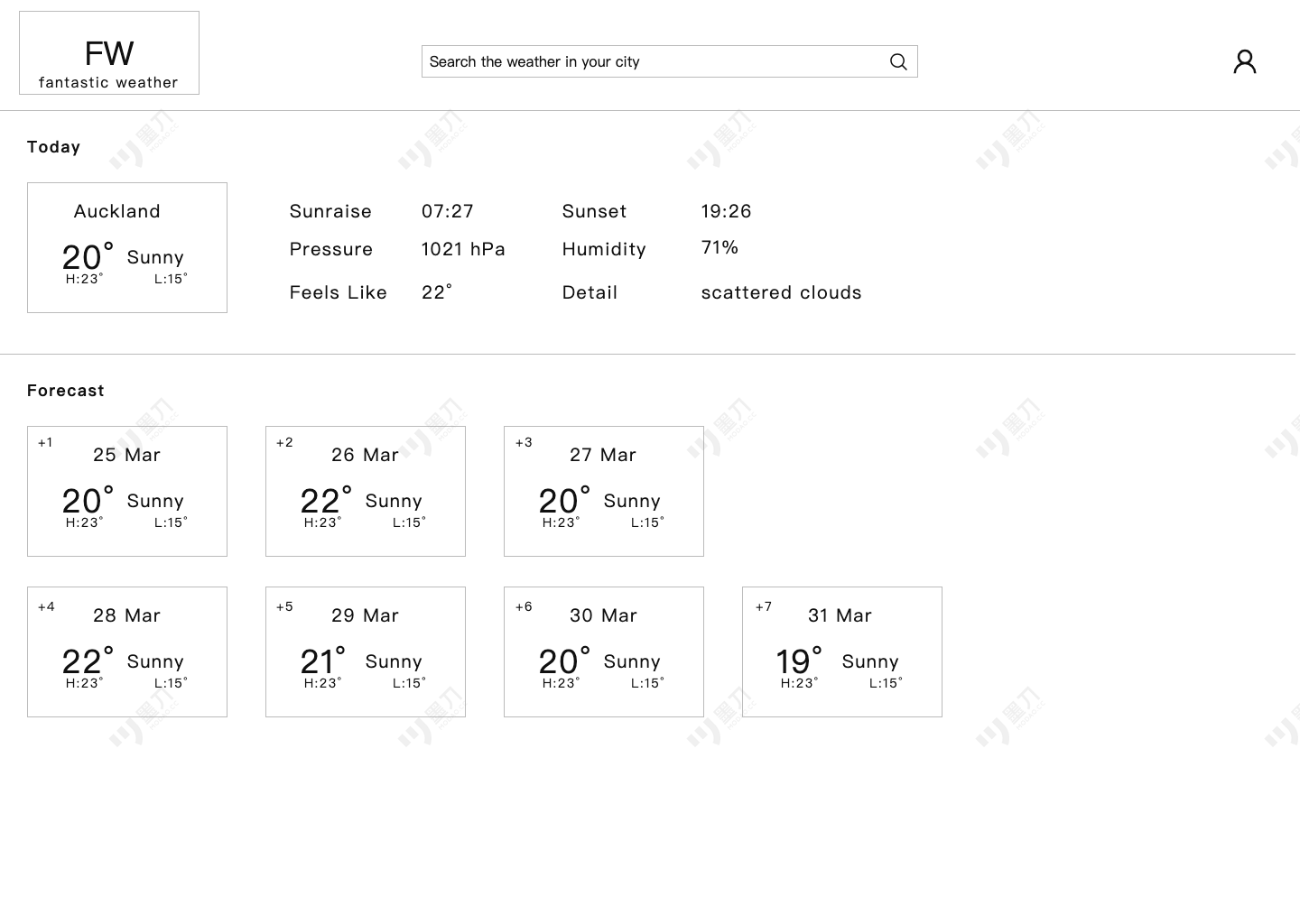
Here is the feature spec and mockup. I spent half a day creating the initial version.
Home page
- Show current weather in 10 famous cities (card)
- Show weather details for a specific city (open as a new page)
- Show user avatar, all use log on / sign up
- Show current weather for favorited cities
- Search one cities and show weather details
Card information
- Show brief weather information (city name, day temp, min temp, max temp, desc)
Weather details
- Show brief weather information (sunrise, sunset, day temp, min temp, max temp, desc, feel_like temp, pressure, humidity, detail)
- Show 7 days weather forecast (temp, min temp, max temp, desc)
Sign up
- Avatar (choose one from build-in 10)
- User name (not allow repeat)
- Password (8+, lower case, upper case, number)
- Password confirm (type again)
- Email (verify if it’s a vaild email)
- reCAPTCHA (use Google reCAPTCHA service)
Log on
- User name
- Password(keep log on status in 180 days)
Favorite/Unfavorite a city
- Favorite a city from weather card (a city) or weather details (a city)
I also investigated third-party weather APIs and requested a free-tier access token for our team.